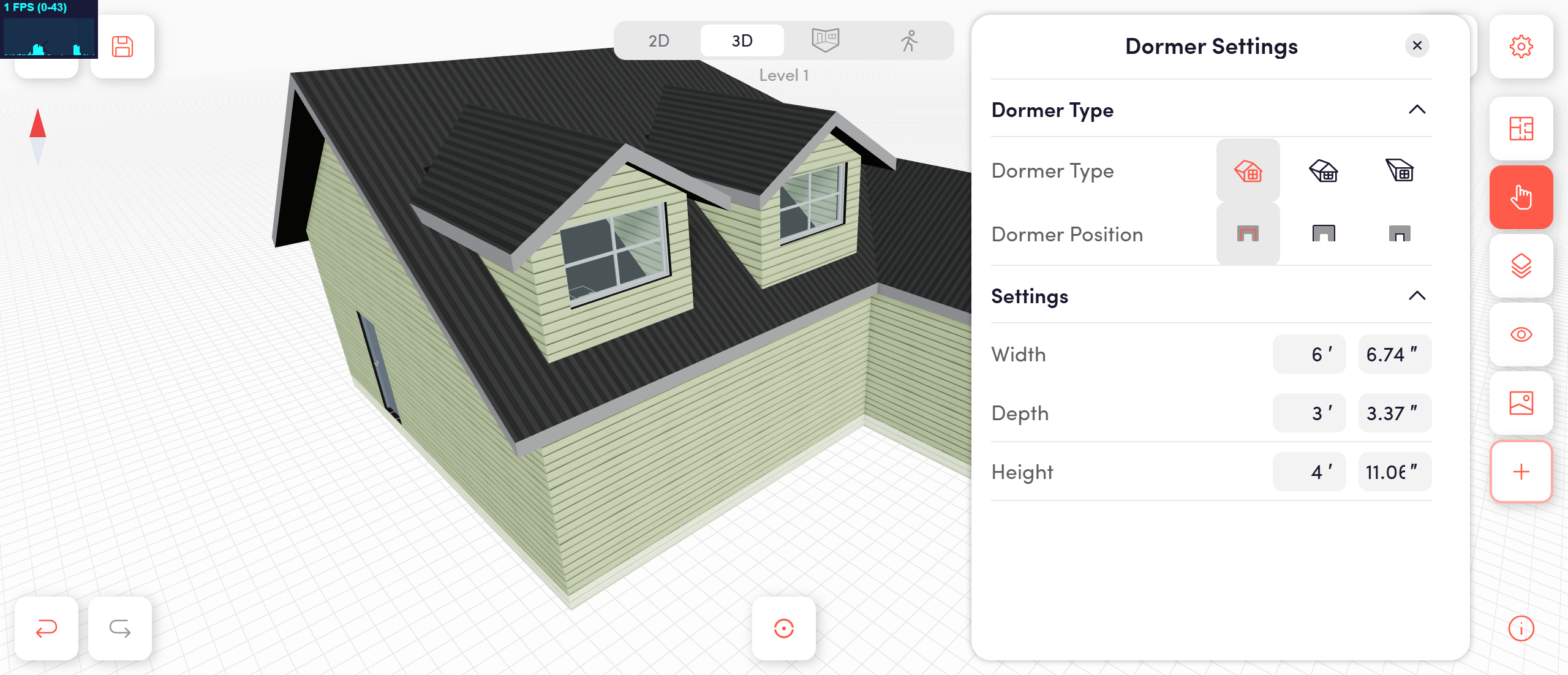
Dormers can dramatically change the character of a house—and now they’re just as easy to add as changing a roof style.
DrawHome now supports dormers as roof add-ons. You can place and customize them directly on any roof in seconds, without complex modeling or manual geometry.
How it works
Click on a roof
Select the “+” (Addables) button
Choose a dormer type:
Gable
Hip
Flat
The dormer is instantly added and aligned to the roof.
Full control, simple UI
Each dormer comes with dedicated controls:
Dormer type & position
Width, depth, and height adjustments
Visual resizing with real-time feedback
Smart by default
Inherits the roof’s texture automatically (metal, shingles, tiles, etc.)
Matches roof pitch and orientation
Stays visually consistent with fascia, edges, and materials
Why this matters
Dormers are common in real homes but notoriously difficult to model in most design tools. DrawHome makes them fast, visual, and editable—no workarounds, no advanced CAD skills required.
This makes DrawHome the first browser-based home design apps to offer:
One-click dormer placement
Parametric sizing
Automatic material inheritance
What’s coming next
Dormers are the first of many Roof additions. Coming soon: Solar panels and Chimneys All attachable, adjustable, and designed to feel native to the roof system. Small roof details make a big difference—and now they take seconds to add.