
Introducing the DrawHome AI Floorplan Generator

Planning your ideal home should be an exciting and straightforward process. When you want to visualize a layout idea or see how textures look on a property, you shouldn’t have to deal with complicated blueprints or tricky setups. Instead, a neat, automated dashboard can handle all the heavy lifting for you instantly.
By clicking a single, orange AI button right inside your online creation workspace, you open up a smart ai generator panel that lets you sketch, arrange, and render a whole property entirely on your own. The system handles all the complex mapping, spatial math, and 3D graphics automatically under the hood.
Advanced ai home design tools bring your structural ideas to life seamlessly. This means you can easily take total control of your project, test styles, and create professional plans without any technical stress or learning curves.
Let’s look at how handy and neat these live AI tools make planning your dream home from a blank canvas.
1. Fast Layouts with an AI Floor Plan Generator
Every awesome home project starts with a layout blueprint. This is the top-down map that shows exactly where your rooms, entryways, and walls sit. An intelligent, built-in ai floor plan generator completely deletes the drafting stress from your workflow by turning your room requirements into a clean structural plan in seconds.
[ 1. Enter Room Counts ] ───> [ 2. Click Orange “Generate” ] ───> [ 3. Hit “Place in Project” ]
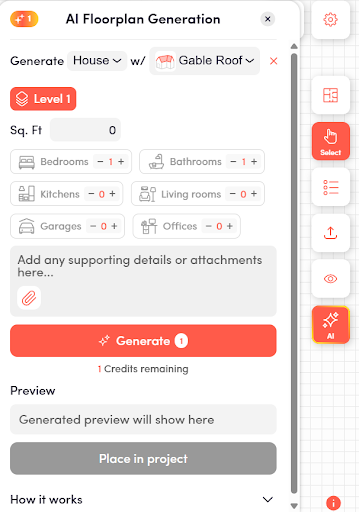
Instead of struggling with confusing settings, you just open up the AI Floorplan Generation card inside the app panel. The control window is simple, clean, and completely visual:
- Sq. Ft Box: Type in your total target space size (for example: 1000).
- Property Type & Roof Dropdown: Set your custom building type and pick a roof style (like a Gable Roof).
- Feature Counters (- / +): Click simple buttons to choose the number of Bedrooms, Bathrooms, Kitchens, or Living Rooms.
- Supporting Details Box: Type custom instructions or add text notes directly for the AI.
The moment you click the bright orange Generate button, the app shows you an instant preview layout on your screen. If you like how it looks, you simply click Place in Project. The walls instantly drop right onto your main design canvas! You can easily toggle between drawing your rooms in a flat 2D view, or instantly view and design your building in a realistic 3D view using the mode selector at the top of your screen.
Smart Visuals with an AI Interior Design Generator
Once your main structure is placed on your project grid, an automated ai room planner makes it simple to understand the space. To bring the internal spaces to life visually, a synchronized ai interior design generator takes charge of the aesthetics.
With a single click, it covers your plain walls with rich textures, matches color temperatures, and renders realistic materials across your floors. You can switch your entire master bedroom style from a warm wooden cabin aesthetic to an ultra-modern concrete industrial studio setup in less than two seconds.
2. Perfect Facade Aesthetics with an AI Exterior Design Generator
Figuring out what the outside of a house looks like can be very tough. Changing real-world materials like siding, brickwork, or paint tones is a massive financial gamble. If you pick a combination that looks bad in real life, fixing the mistake is incredibly expensive.
A cloud-powered ai exterior design generator acts as your ultimate creative safety net. By clicking the AI Render tool inside the app’s right-hand toolbar, you can experiment with hundreds of different facade variations completely risk-free.
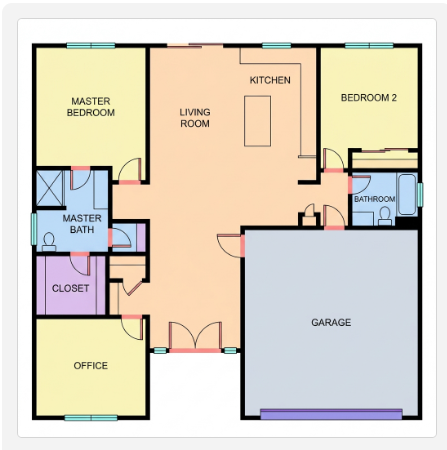
Clicking the orange sparkle icon opens your core AI toolkit instantly:
- AI Render: Creates clean, cinematic 3D images of your indoor and outdoor materials.
- AI Floorplan Generation: Builds custom structural blueprints based on your exact square footage.
Using an automated ai home exterior design tool makes trying new styles fast and handy. If you want to brainstorm ideas without spending anything, a premium free ai exterior design tool allows you to swap styling choices on the fly. You can change your window trims, try out rustic stone pillars, or use a free ai home exterior design tool to see your house from different camera angles under realistic sunshine or soft golden hour lighting. The AI handles all complex textures, reflections, and shadows automatically.
The Automatic Roof Spawner Mechanics
One of the hardest parts of traditional 3D modeling is trying to draw a roof. Adjusting pitch lines, slopes, and roof eaves to fit perfectly without leaving ugly gaps requires complex engineering knowledge.
The app automates this completely right inside your setup window. When you pick your roof style (like a standard Gable Roof) in the generator panel, the engine automatically calculates the exact structural angles and builds a clean, flawless roof on top of your walls the moment your plan is generated.
Incredibly Handy Workflows with Zero Technical Stress
The absolute best part about using a modern, automated AI workspace is that it completely removes traditional design friction. It packs industrial-grade 3D graphics power and deep structural logic rules into a clean, lightweight experience that runs directly inside your web browser. You don’t need a high-end PC, you don’t need to read hundreds of pages of instructions, and you don’t need professional training to build something gorgeous.
The entire layout dashboard is kept simple, organized, and entirely visual. If you ever want tips or a quick guide, you can simply click the red information (i) icon located at the bottom-right corner of your workspace to view handy tips, video tutorials, and interactive feature breakdowns. You just select your choices, click generate, and let the AI build your vision right before your eyes.
Ready to Generate Your Dream Space?
Stop trying to draw layouts on small napkins or getting stuck in slow, frustrating design software. Experience how easy and neat home creation can be today.
Explore all the features on the main DrawHome Platform, or open your active canvas right now inside the DrawHome App to start generating your custom dream home instantly!